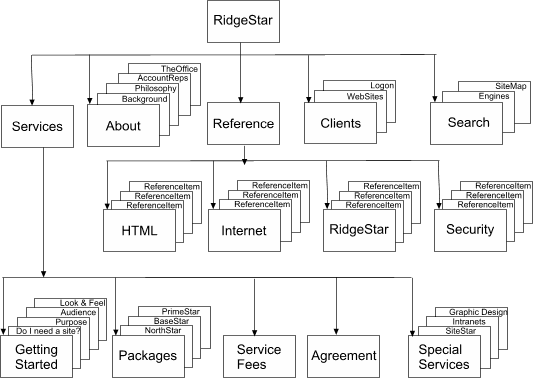
To make your own Site structure, start by creating a hierarchy for the major segments in your Site, using items from your information organization as a guide. As you go into deeper detail on a segment topic, break it into a new level. Then, review the outline and make sure that each topic is in the appropriate section. For example, if one segment contains more levels then the others, it may need to be broken up into different sections.
You might want to consider providing basic categories such as "What's New", "Products", "Services", and "About us". However, the key here is to make sure to organize the information according to your site's purpose and audience. The following sample is the basic structure chart we started from to build our own Site (the site you are currently looking at):
Of course, if your site is a simple 3 or 4 page site, creating an entire structure chart of this sort is not necessary. However, the larger you anticipate your site being in function, the more important taking the time to properly structure it is.